Candidate management software so you never lose a candidate across client roles
From spreadsheet chaos to one organized database your whole agency works from
Here's how JuggleHire organizes your candidates
One candidate database
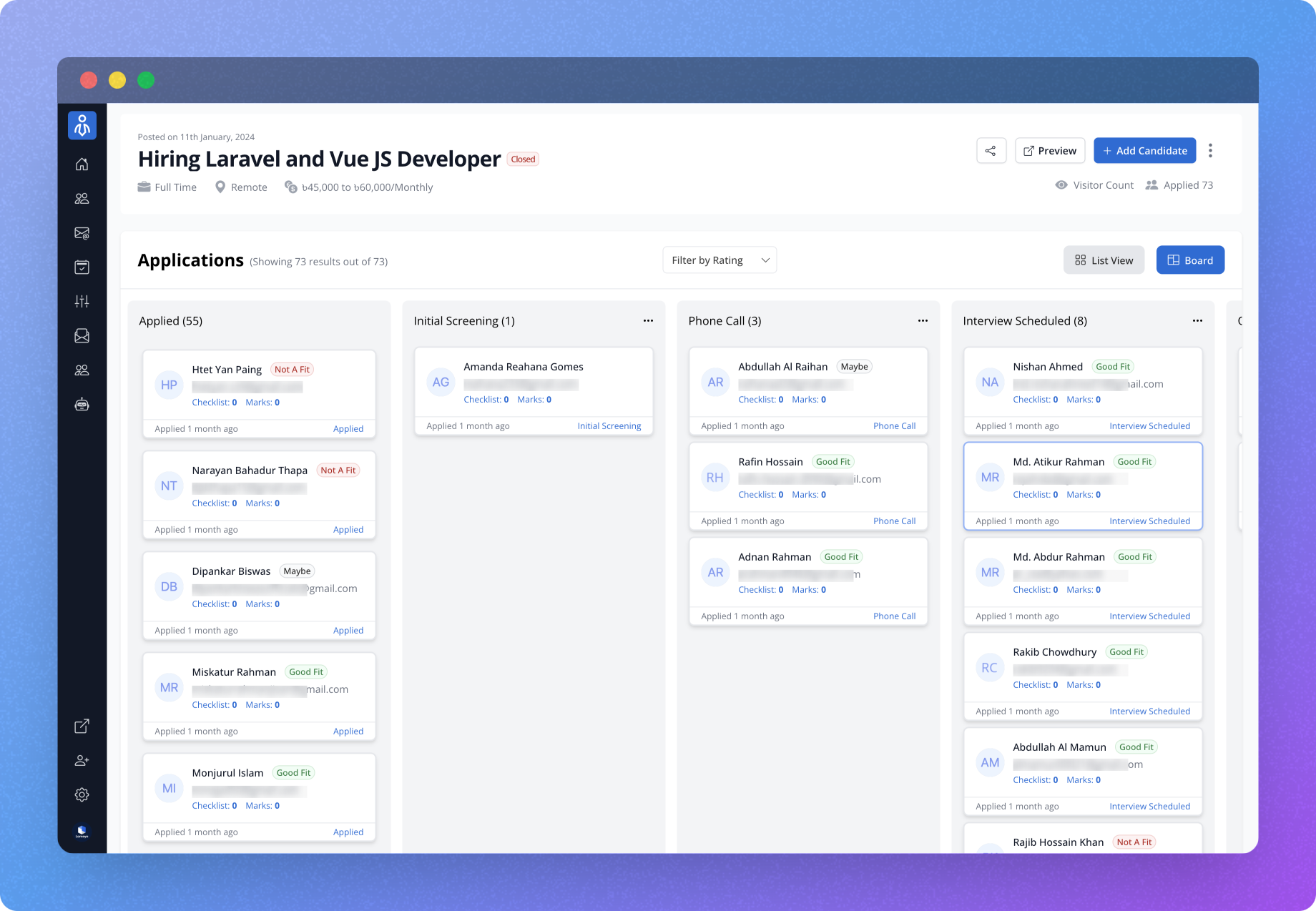
View every candidate in one organized dashboard across all client roles - not scattered across spreadsheets or email.
Visual hiring pipeline
Move candidates through customizable stages for each client role with simple drag-and-drop - beyond what any form tool can provide.
Applicant evaluation tools
Rate, comment, and track candidate qualifications with built-in assessment tools.

Built for your whole agency, one flat price
Shared candidate access
Give every recruiter secure access to your database without sharing spreadsheet passwords — one flat price, no per-seat fees.
Real-time activity tracking
See who's reviewed which candidates - impossible with basic form tools.
Collaborative hiring decisions
Make hiring decisions as a team with structured evaluation tools and visibility into everyone's feedback.
Communication hub for your placements
All candidate messages in one place
View complete email history with each applicant - no more searching through Gmail threads.
Automated rejection handling
Send personalized rejection emails with one click - far beyond basic form capabilities.
Candidate source tracking
Track where your best candidates come from to optimize your sourcing channels.

Benefits for a busy agency
Hiring process clarity
See exactly where each candidate stands in your pipeline at a glance.
Improved recruiter alignment
Every recruiter works from the same database, eliminating confusion and duplicate outreach.
Data-driven decisions
Track metrics on your hiring process to continuously improve results.
Professional candidate experience
Provide timely updates and a structured process that reflects well on your agency brand.
Candidate management software FAQs
What is candidate management software?
Candidate management software collects every candidate in one organized place and helps you move them through your stages across client roles. JuggleHire gives you a candidate inbox with kanban, list, and pipeline views instead of scattered spreadsheets and email threads.
How does the candidate pipeline work?
Every client role has a customizable pipeline. You create and reorder stages with drag-and-drop, then move candidates between stages on a kanban board. You can also switch to a list view for detailed information or a pipeline view for stage-based management.
Can I take bulk actions on multiple candidates at once?
Yes. You can select multiple candidates from the inbox and move them between pipeline stages, send emails, or update their status in a single action, which saves time when processing high volumes of applicants.
Can my team review candidates together?
Yes. Recruiters get secure shared access to applications, can add notes and evaluations on candidate profiles, and rate candidates with a 1-to-5 star system, so shortlist decisions are made together with full visibility.
Can I email candidates without leaving the inbox?
Yes. You can send emails to candidates directly from JuggleHire, view the complete email history per candidate, use reusable email templates, and send bulk emails to multiple candidates from the inbox board view.
Can I import existing candidates into JuggleHire?
Yes. The Imports Hub lets you bring in candidates from a CSV file, a Google Sheet, or a stack of PDF resumes. Imported resumes are parsed automatically and staged for review so you can correct fields before they go live.
Explore related features
AI candidate ranking
JuggleHire scores every candidate against the client role so you shortlist the best first.
Learn moreSkills assessments
Send tests that grade themselves and surface real ability, not just résumés.
Learn moreAutomation
Set rules once — emails, stage moves, and rejections run on their own.
Learn moreReady to organize your hiring process?
JuggleHire goes beyond simple job posting. Leverage custom forms, powerful screening filters, and automated social media previews to find the perfect fit for your team.