Quick answer: An ATS (applicant tracking system) manages the people who apply to a specific open role — it moves them from "applied" to "hired." A recruitment CRM manages relationships with candidates over time, whether a role is open or not — it's your reusable talent database. The two overlap so much now that for most in-house teams and small agencies, buying them separately is a waste. A modern recruitment CRM like JuggleHire does both jobs in one tool, at one flat price.
Last Updated: October 20, 2026
#The one-line difference most people get wrong
Search "recruitment CRM vs ATS" and you'll read the same tidy split everywhere: an ATS is reactive (it handles inbound applicants) and a CRM is proactive (it nurtures leads). That's not wrong, but it hides the part that actually decides which one you need.
Here's the sharper version: an ATS is organized around a job. A CRM is organized around a candidate.
In an ATS, everything hangs off a requisition. Open a role, applicants flow in, you screen and move them down a pipeline, someone gets hired, the job closes. When the job closes, that pipeline is essentially done.
In a CRM, everything hangs off a person. A candidate you talked to eight months ago for a role they didn't take is still in your database, still tagged, still reachable the moment a fitting role opens. The relationship outlives any single job.
That distinction — job-centric vs candidate-centric — is the whole ballgame. Everything else follows from it.
#What an ATS actually does
An applicant tracking system is built to run one hire well. Its core jobs:
- Post a role to a career page and job boards.
- Collect applications into one place instead of a messy inbox.
- Screen and filter applicants, often with knockout questions or scoring.
- Move candidates through stages — applied, screened, interview, offer.
- Coordinate the hire — scheduling, scorecards, offer letters, rejections.
If your problem is "I posted a job and now I have 200 résumés in Gmail and no idea who's good," an ATS is the fix. It's a pipeline for the role in front of you. (If you're new to the category, we wrote a full primer on what an applicant tracking system is.)
The limitation: a pure ATS forgets. Once the role closes, the runners-up — often genuinely strong people — get buried. Next quarter you post a similar role and start sourcing from zero, as if you never met them.
#What a recruitment CRM actually does
A recruitment CRM (candidate relationship management) is built for the long game. Its core jobs:
- Keep a searchable talent database of every candidate you've ever touched.
- Tag and segment people by skill, seniority, location, or how a past process went.
- Nurture relationships — stay in touch with strong candidates before a role exists.
- Re-engage past candidates the instant a fitting role opens.
- Track a pipeline of client roles (for agencies) the way a sales CRM tracks deals.
If your problem is "we keep re-sourcing the same kinds of people over and over" or "our best candidate from last quarter is gone because nobody followed up," a CRM is the fix.
Agencies live and die on this. A recruiter's real asset isn't the open req — it's the relationships and the database. That's why "recruitment CRM" is the term staffing and permanent-placement firms reach for, while "ATS" is the term a company hiring for its own team reaches for. The label matters less than the fit, though: if you're shopping the ATS side, our buyer's checklist for agency applicant tracking walks through what changes once you're placing for clients instead of hiring for yourself.
#Recruitment CRM vs ATS: side by side
| ATS | Recruitment CRM | |
|---|---|---|
| Organized around | The open job | The candidate |
| Time horizon | One hire | Ongoing relationship |
| Best at | Running an active pipeline | Building a reusable talent pool |
| Candidate after role closes | Usually forgotten | Stays in the database |
| Typical buyer | In-house team hiring for itself | Agency or recruiter placing repeatedly |
| Sourcing style | Reactive (inbound) | Proactive (outbound + re-engage) |
Read that table and the honest takeaway is: these aren't competitors, they're two halves of the same job. You want the pipeline of an ATS and the memory of a CRM. The interesting question isn't "which one," it's "do I have to buy two tools to get both?"
#The false choice: why "vs" is the wrong frame for most teams
For a long time the answer was yes — you bought an ATS, and later, when you got big enough, you bolted on a CRM (or an "add-on module" your ATS vendor upcharged for).
That made sense when the two were genuinely different products. It makes much less sense now. Most of what a candidate-relationship database needs — tags, a searchable pool, re-engagement — is cheap to build on top of a pipeline tool. So the modern recruitment CRM just includes the ATS pipeline, and the modern ATS just keeps its candidates in a reusable pool. The line has blurred to the point where the label tells you more about who the vendor sells to than what the software does.
So here's the disagreeable opinion: if you're a small in-house team or a lean agency, choosing between a CRM and an ATS is a mistake. You'll pick one, hit its blind spot within two quarters, and start paying for the other. Buy the tool that does both from day one.
The teams that should care about the distinction are large operations that have already committed to a heavyweight enterprise ATS and now need a separate sourcing CRM to feed it. That's a real workflow — and it's also a tiny fraction of the market. Everyone else is overthinking it.
#How to decide what you need
Skip the category war and answer three questions about how you actually hire.
#1. Do you hire the same kinds of roles repeatedly?
If yes — you re-post similar roles every few months — you need the CRM's memory. Re-sourcing from scratch each time is the single biggest hidden cost in small-team recruiting. A reusable database pays for itself the first time last quarter's runner-up becomes this quarter's hire.
If you hire rarely and each role is one-off, a straightforward ATS pipeline may be all you need — and for a solo desk under roughly 20 active candidates, a simple candidate tracker, or even a spreadsheet, holds up longer than most people expect.
#2. Are you hiring for yourself or placing for clients?
Placing candidates for clients is inherently CRM-shaped: you're managing relationships on both sides (candidates and clients) as an ongoing book of business, not a single pipeline. Agencies should default to a recruitment CRM — we compared nine of them on what a staffing desk actually pays, since most of that market still bills per recruiter.
Hiring for your own team leans ATS — but see question 1, because even in-house teams benefit from a talent pool.
#3. How much are you willing to pay for the seam between two tools?
Two tools means two subscriptions, two logins, an integration to maintain, and candidate data that drifts out of sync. That seam has a real cost in money and in dropped candidates. If a single tool covers both jobs at one price, the integrated option almost always wins for teams under a few hundred hires a year.
#Where JuggleHire fits
JuggleHire is built exactly for the "you shouldn't have to choose" case. It runs the ATS pipeline — job posting, a branded career page, AI candidate ranking, interview scheduling, scorecards, and offer letters with e-signature — and it keeps every candidate in a reusable, searchable talent pool you can re-engage whenever a fitting role opens. Pipeline plus memory, in one place.
The pricing model is deliberately built for small teams and agencies: one flat price for your whole team, not per recruiter. Starter is $15/month and Unlimited is $49/month, billed monthly, with a 14-day free trial. The price stays flat for up to 5 team members on Starter, and Unlimited has no team-member cap — which matters a lot when the per-seat CRMs and ATSs start stacking up.
If you want to see how that stacks against the tools you're weighing, we keep honest side-by-side comparisons and a full best recruitment CRM software roundup.
#The bottom line
An ATS runs the role in front of you. A recruitment CRM remembers everyone, so you never start from zero. They solve different problems — but for most small teams and agencies, both problems show up, and buying two tools to solve them is the expensive way round.
Pick the tool that does both. Judge it on whether it runs a clean pipeline and keeps a reusable candidate database, at a price that doesn't punish you for adding recruiters. That's the actual decision behind "recruitment CRM vs ATS" — and for a lot of teams, it's a five-minute one.
#Frequently Asked Questions
#Is a recruitment CRM the same as an ATS?
No, but they overlap heavily. An ATS is organized around an open job and moves applicants through a hiring pipeline. A recruitment CRM is organized around candidates and manages relationships with them over time, open role or not. Many modern tools, including JuggleHire, combine both.
#Do I need both an ATS and a CRM?
You need both jobs done — running a pipeline and keeping a reusable talent pool. You don't necessarily need two tools. For small in-house teams and lean agencies, a single recruitment CRM that includes ATS pipeline features covers both without the cost and data-sync headache of two subscriptions.
#Which is better for a recruitment agency, a CRM or an ATS?
A recruitment CRM. Agency work is relationship-driven on both the candidate and client side, and your database is your core asset. Look for a CRM that also runs a proper hiring pipeline so you're not bolting on a second tool.
#What's the difference between a recruitment CRM and a sales CRM?
A sales CRM (like Salesforce or HubSpot) tracks deals and customer relationships. A recruitment CRM applies the same relationship-management idea to candidates: a searchable talent database, tagging and segmentation, and re-engagement — plus hiring-specific features like career pages, screening, and interview scheduling that a sales CRM doesn't have.
#How much does a recruitment CRM cost?
It ranges widely, from around $15/month for basic tools to $500+/month for enterprise platforms, and many charge per user. JuggleHire uses flat team pricing instead — $15/month (Starter) or $49/month (Unlimited) for your whole company, not per recruiter — so cost stays predictable as your team grows.
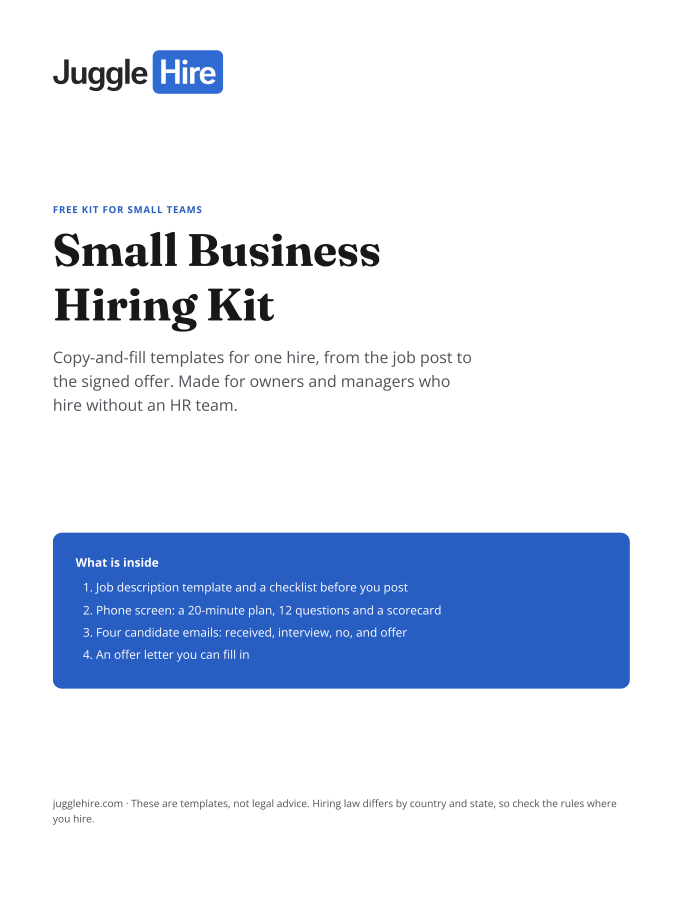
Free download
Get the Small Business Hiring Kit
- Job description template and a checklist before you post
- 20-minute phone screen: 12 questions and a scorecard
- Four candidate emails: received, interview, no, and offer
- An offer letter you can fill in
Free. We email you the kit and three short hiring tips. Unsubscribe any time.
Tagged with:

Zakir Hossen
Zakir, founder of JuggleHire - a Google Forms alternative for hiring. Bootstrapped entrepreneur and software engineer with 10+ years coding experience from BD.
Related Posts
ATS for Staffing Agency: How to Choose One in 2026
A buyer's checklist for picking an ATS for a staffing agency — what to look for, and where JuggleHire fits.
ats for staffing agencystaffing agency softwareapplicant tracking system
Read more
ATS for Staffing Agencies: The Real Monthly Cost for a 3-Recruiter Team (2026)
What a 3-recruiter staffing agency actually pays for an ATS — verified per-seat rates from $237 to $597/mo, and the flat-price alternative at $15/mo.
ats pricing for staffing agenciesstaffing agency software costper-seat vs flat-rate ats+1 more
Read more