Quick Answer: Recruitment agency automation means using software to handle the repetitive parts of placing candidates — screening applicants, ranking them, scheduling interviews, sending status emails, and moving candidates through stages — so your recruiters spend time on calls and client relationships instead of admin. Small permanent-placement agencies (2–8 staff) get the fastest payoff automating three things first: candidate ranking, interview scheduling, and stage-based email triggers. Purpose-built tools like JuggleHire — a recruitment CRM for permanent-placement agencies — charge one flat price per agency ($15–$49/mo, not per recruiter); agency-native platforms like Bullhorn charge per recruiter for the same core workflow, and JobAdder does not publish pricing at all.
This guide covers what recruitment agency automation actually does, what to automate first, real pricing, and how to pick a tool without over-buying.
#What Is Recruitment Agency Automation?
Recruitment agency automation is software that removes manual steps from an agency's placement workflow — sourcing to submittal to fill. For an in-house hiring team, "automation" usually means faster applicant screening. For an agency, it means something more specific: keeping candidates moving across multiple open roles for multiple clients at once, without a recruiter manually re-checking each one. (For the wider picture, see how recruitment agencies use an applicant tracking system.)
The core building blocks:
- AI candidate ranking — score any applicant against the role in one click when you open their profile, instead of reading every resume by hand
- Automated stage transitions — a candidate who completes an assessment moves to the next stage without someone dragging a card
- Triggered emails — rejection notices, interview confirmations, and status updates fire automatically on stage change
- Self-scheduling — candidates pick their own interview slot from the recruiter's calendar, no back-and-forth
- Bulk actions — reject, move, tag, or email 50+ candidates in one action instead of one at a time
- Talent pool re-use — a candidate sourced for one client role stays searchable for the next one, instead of getting buried in a closed job folder
#What to Automate First (in order)
Don't try to automate everything on day one. In order of ROI for a small agency:
#1. Candidate ranking
Instead of reading every resume that lands in a role, open a candidate's profile and let AI verdict scoring flag deal-breakers and rank them — one click, no resume reading. This narrows a large applicant pool down to the shortlist worth a human read.
#2. Interview scheduling
Native self-scheduling (candidate picks a slot, calendar auto-syncs with Google Meet or Zoom) removes the email back-and-forth that eats a recruiter's afternoon. This is one of the fastest wins because it has zero learning curve for candidates.
#3. Stage-triggered emails
Set a rule once: "candidate rejected → send templated email." "Candidate moves to interview → send confirmation." You stop writing the same status update by hand every time.
#4. Bulk operations
When a role closes or a client passes on a batch, moving or rejecting candidates in one action instead of one-by-one saves real time on a busy week.
#5. Talent pool search across roles
This is the one most generic ATS tools get wrong for agencies — they treat every job as standalone. An agency needs a candidate to stay visible across every client role they might fit, not disappear once one job closes.
#Recruitment Agency Automation Tools — Pricing Compared
Agency-native tools mostly charge per recruiter, on annual contracts, which punishes exactly the small agency this guide is for — you're locked in at whatever headcount you sign at. Here's the real math for a 3-recruiter agency (billing term noted per row):
| Tool | Pricing model | Cost for 3 seats/mo | Notes |
|---|---|---|---|
| Bullhorn | Per user/mo, Starter–Core tiers, annual contract (term unpublished) | ~$297–$495 | Starter $99/user, Core $165/user; higher tiers reported up to ~$315/user. Advertises free implementation on Starter/Core. |
| JobAdder | Per user, unpublished pricing, annual | Est. ~$285–$600 | JobAdder does not publish prices; third-party estimates put it at $95–$200/user/mo |
| Recruiterflow | Per user/mo, Platform plan, annual | ~$357 | Platform is $119/user/mo billed annually (~$149/mo month-to-month), 3-seat minimum. AIRA is a separate, custom-priced plan, not a Platform add-on |
| Loxo | Per user, Core tier, annual | ~$447 | Core is $149/user/mo billed annually. Professional is $199/user/mo billed annually (~$597/mo for 3 seats). No published month-to-month rate |
| Recruit CRM | Per user/mo, annual billing | ~$255–$285 | Commonly cited at $85/user/mo on annual billing; at least one source puts Pro nearer $95/user — no single published rate |
| JuggleHire | Flat, per agency, monthly | $15/mo | Starter plan: 3 open jobs at a time, 5 team members — same $15 whether it's 1 recruiter or 5 |
The math that matters: JuggleHire charges per agency, not per recruiter. A 3-recruiter agency on Bullhorn's Core tier pays close to $495/mo. The same agency fits JuggleHire's Starter plan at $15/mo flat — and adding a 4th or 5th recruiter costs $0 more, since Starter covers up to 5 team members on one plan.
#JuggleHire: the recruitment CRM for permanent-placement agencies
JuggleHire is built for US permanent-placement agencies (2–8 staff) in tech or finance/accounting — one flat price that covers your whole team, not per recruiter.
| Starter | Unlimited | |
|---|---|---|
| Monthly | $15/mo | $49/mo |
| Open jobs at once | 3 | Unlimited (fair use: 50) |
| Team members | 5 | Unlimited (fair use: 50) |
| Applicants per job | Up to 200 | Up to 1,000 |
| AI-written job posts/month | 10 | 50 |
| AI candidate ranking, scheduling, offer e-signature | ✓ | ✓ |
| Bulk actions, GDPR tools | ✓ | ✓ |
| Automation rules | — | ✓ |
What pushes an agency to upgrade: Starter's 3-open-job cap and 5-seat cap, which an agency running multiple client roles at once can hit fast — and the automation engine itself (stage-triggered emails) is Unlimited-only. Since items #3 and #4 above are the automation this guide recommends building next, most agencies that follow this checklist end up on Unlimited ($49/mo). Every plan comes with a 14-day free trial (credit card required).
#What Automation Can't Fix
Automation speeds up the workflow you already have — it doesn't create candidate flow, and it won't fix a broken submittal process by itself. Be honest about the gaps:
- No active sourcing. Automation ranks and moves candidates who are already in your pipeline; it doesn't go find new ones. You still need LinkedIn Recruiter or outbound sourcing to fill the top of the funnel.
- No client-record data model (yet, in JuggleHire). Candidates live in your talent pool, not tied to a specific client company as a separate record. For most 2–8 staff agencies this is fine day-to-day; agencies that need formal client/contact/submittal tracking as a separate object should factor that in before switching tools.
- Onboarding still takes a day or two, even with a fast setup — importing your existing candidate mess (CSV, spreadsheets, resumes) needs a review pass, not a magic upload.
#How to Roll Out Automation Without Breaking Your Process
- Start with one automation rule, not ten. Pick the highest-friction step (usually scheduling or rejection emails) and automate just that first, then check whether it moved your recruitment agency KPIs, such as time-to-fill.
- Import before you automate. Bring your existing candidate database in first — automation rules only help candidates that are actually in the system.
- Watch the first week closely. Automated emails and stage moves should feel invisible to candidates, not robotic. Read what actually goes out before trusting it unattended.
- Add rules incrementally. Once the first automation is running clean, add the next (bulk ops, then talent-pool search) rather than configuring everything on day one.
#FAQ
#What does "recruitment agency automation" actually mean?
It's using software to handle repetitive placement tasks automatically — ranking candidates, scheduling interviews, sending status emails, and moving candidates between stages — so recruiters spend time sourcing and closing instead of doing admin by hand.
#Is automation worth it for a small agency (2–8 staff)?
Yes, if you're running more than a handful of roles at once. Below that, the setup time may not pay off yet. Once you're juggling 8+ open roles across multiple clients, automation directly reduces the admin hours that don't bill.
#How is agency automation different from generic ATS automation?
Generic ATS automation optimizes for one job posting at a time. Agency automation needs to keep a candidate visible and re-usable across multiple client roles simultaneously, since agencies sell placements, not just fill their own open positions. See our recruitment CRM vs ATS guide for the deeper distinction.
#What's the cheapest way to automate a permanent-placement agency's hiring?
Avoid per-recruiter pricing if you can — it scales against you as you grow. JuggleHire's Starter plan ($15/mo flat) charges the same price regardless of team size, up to 5 team members; the automation engine itself is on the Unlimited plan ($49/mo, unlimited seats).
#Does automation replace sourcing?
No. Automation speeds up what happens to candidates once they're in your pipeline. It doesn't source new candidates — you still need outbound sourcing (LinkedIn, referrals, job boards) to keep the pipeline full. For a broader look at automating the full hiring loop, see our recruitment automation guide.
Free download
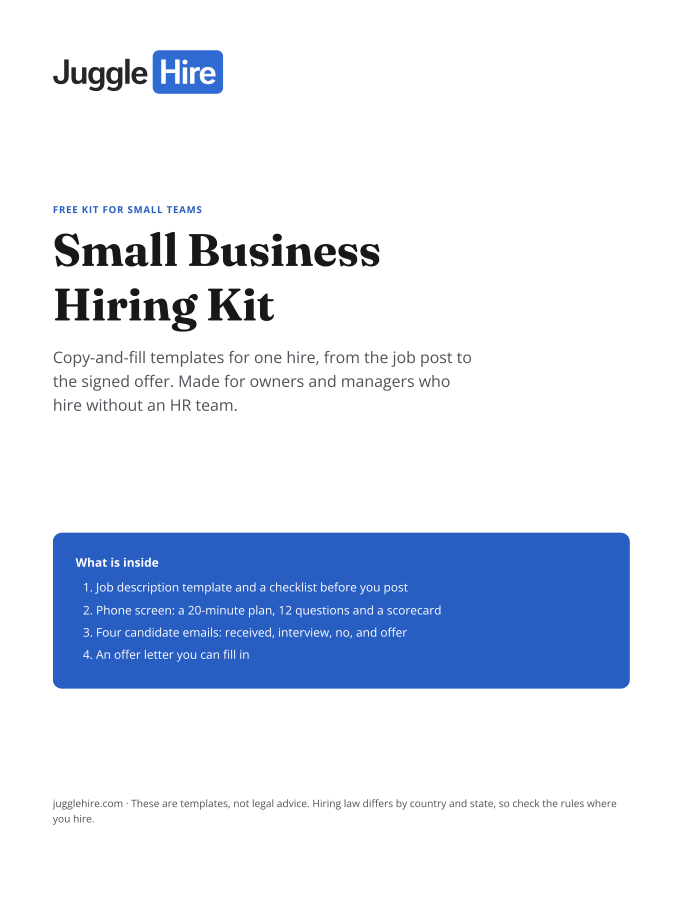
Get the Small Business Hiring Kit
- Job description template and a checklist before you post
- 20-minute phone screen: 12 questions and a scorecard
- Four candidate emails: received, interview, no, and offer
- An offer letter you can fill in
Free. We email you the kit and three short hiring tips. Unsubscribe any time.
Tagged with:

Zakir Hossen
Zakir, founder of JuggleHire - a Google Forms alternative for hiring. Bootstrapped entrepreneur and software engineer with 10+ years coding experience from BD.
Related Posts
ATS for Staffing Agency: How to Choose One in 2026
A buyer's checklist for picking an ATS for a staffing agency — what to look for, and where JuggleHire fits.
ats for staffing agencystaffing agency softwareapplicant tracking system
Read more
ATS for Staffing Agencies: The Real Monthly Cost for a 3-Recruiter Team (2026)
What a 3-recruiter staffing agency actually pays for an ATS — verified per-seat rates from $237 to $597/mo, and the flat-price alternative at $15/mo.
ats pricing for staffing agenciesstaffing agency software costper-seat vs flat-rate ats+1 more
Read more